
How to Fix Stringing and Fine Line Defects in UV Printing
UV printing stringing—thin, hair-like ink lines that trail from the printhead—is one of the most frustrating problems in the UV printing process. It ruins print quality, wastes material, and can indicate a deeper issue with your machine. The good news is that stringing is usually fixable. Here is what causes it and how to resolve it.
UV Printing Stringing – What Causes It
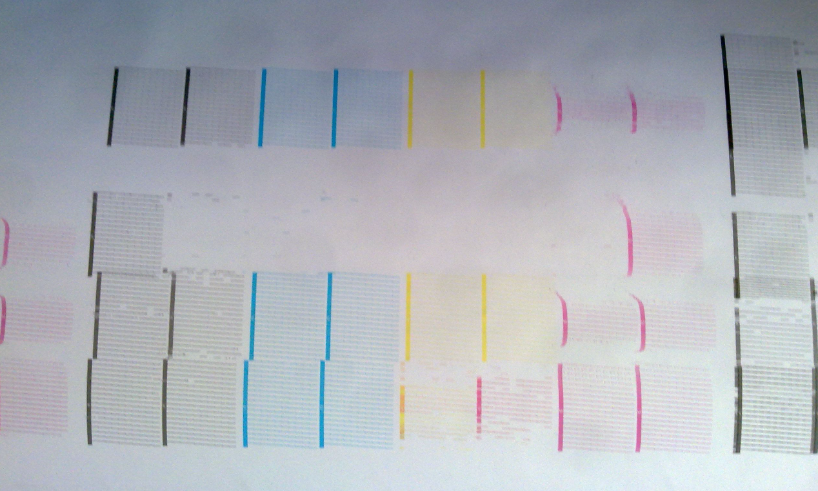
Stringing typically comes from one of four sources. The first is a UV printer with clogged nozzles: partial blockages cause ink to trail instead of forming clean droplets. The second is incorrect printhead height: if the head is too close to the substrate, ink can smear or pull. The third is ink supply instability: air in the ink lines or unstable negative pressure causes inconsistent droplet formation. The fourth is dust or debris: particles on the substrate or printhead surface interfere with ink release.
UV Printing Stringing – The Fixes
Clean the Printhead. Run automatic cleaning cycles. If clogging persists, use a lint-free cloth with approved cleaning solution to gently wipe the printhead plate. Never use dry cloths or sharp objects.
Adjust Printhead Height. The correct distance between the printhead and the substrate is typically 1.5–3mm. Too close causes smearing. Too far causes ink drift and satellite dots.
Check Ink Supply and Pressure. Inspect ink lines for air bubbles. Verify that negative pressure is set correctly for your ink type and print speed. Unstable pressure is a common cause of stringing.
Clean the Substrate. Dust and debris on the cup surface can cause ink to trail. Wipe with isopropyl alcohol before printing.
Optimize Curing Settings. Inadequate UV curing can leave ink tacky and prone to trailing. Ensure lamps are in good condition and curing power is set correctly.
When to Call for Support
If UV printing stringing persists after these steps, the issue may be mechanical or electrical. A UV printer manufacturer with responsive technical support can help diagnose deeper problems.
For more information on UV curing standards and technical guidelines, visit IEC.ch.